
Yes, Trading 212 has a public API. It still carries a beta label. Also, it works only on Invest and Stocks & Shares ISA accounts, not the SIPP or CFD account. With a key you can read your account summary, positions, orders, dividends and transaction history. You can also place market, limit and stop orders. The Pies endpoints still run, but the docs mark them as deprecated.
New to ETFs? Start with the free checklist.
The European ETF Starter Kit: what to check before you buy your first UCITS ETF — domicile, costs, tax and broker set-up.
What the Trading 212 API is
An API (application programming interface) lets software talk to your account, so you do not need to tap through the app. The broker calls its version the Trading 212 Public API. The official documentation lives at docs.trading212.com. At the time of writing (September 2026), it describes the API as version 0, “currently in beta and under active development”.
That beta label matters. It means endpoints can change and Trading 212 is still adding features. In addition, some behaviour is not yet as robust as a mature trading API. The documentation is explicit about one example: the market order endpoint “is not idempotent”. So sending the same request twice may create two orders. If your code retries on a timeout, check your pending orders first instead of blindly resending.
Trading 212 runs two separate environments:
- Paper trading (demo):
https://demo.trading212.com/api/v0— practice money, so it is ideal for testing scripts. - Live trading (real money):
https://live.trading212.com/api/v0— your actual account.
The Help Centre notes that API key versions may differ between real and demo accounts. Therefore, generate a key in the environment you intend to use.
Which accounts can use the API
Check this first, because it rules out a lot of people. According to both the API documentation and the Help Centre, the broker enables the Public API only for the Invest account and the Stocks & Shares ISA. The Help Centre states that the API “is not currently available for SIPP accounts”. It adds that the broker “may consider SIPP API support in future versions”. However, there is no mention of API access for the Cash ISA or the CFD account.
There are also two functional limits that affect anyone holding funds in more than one currency:
- The API executes orders only in the primary account currency.
- The API does not support multi-currency accounts. As a result, balances, positions and results come back in your primary currency only.
If you are unsure which account type you hold, see our guide to Trading 212 account types. It explains the differences between Invest, the ISAs and the SIPP.
What you can do with it: endpoints and rate limits
The documentation groups endpoints into accounts, instruments, orders, positions, historical events and pies. Every group has its own rate limit (the maximum number of requests allowed in a time window). The broker applies limits per account, whichever key or IP address you use. So two scripts running against the same account share one allowance.
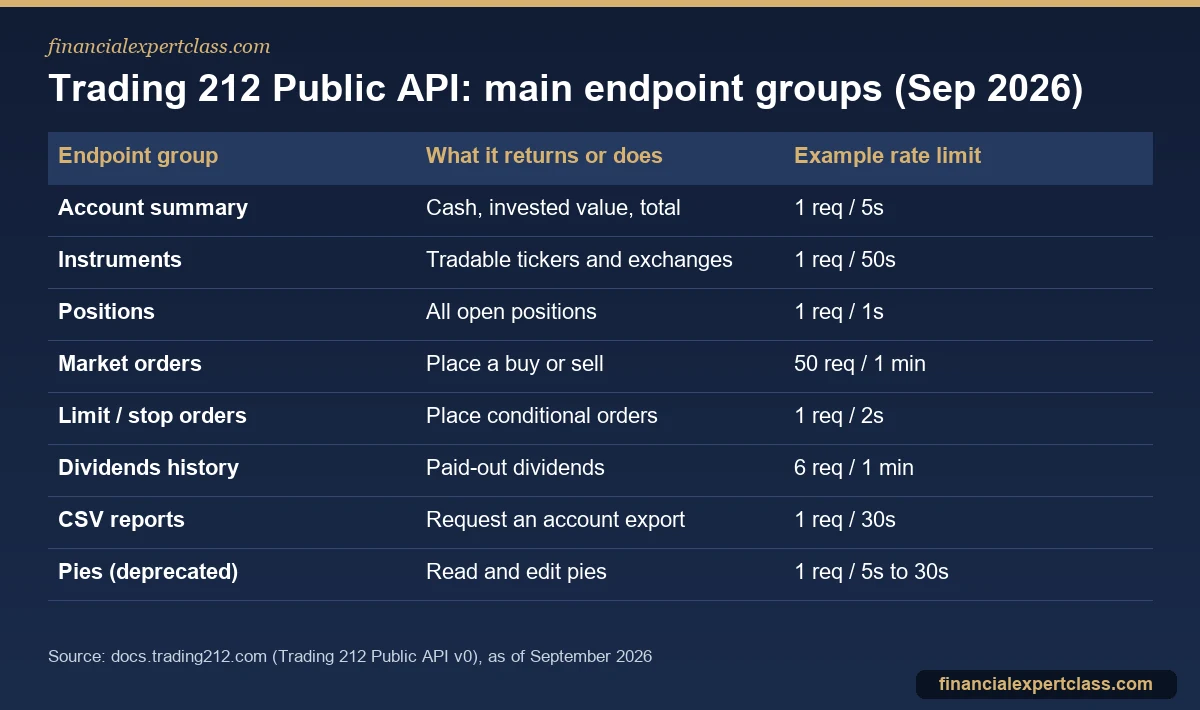
A few details are useful in practice:
- Instrument lists (every tradable ticker and exchange schedule) refresh every 10 minutes. So there is no point polling them more often.
- Selling uses a negative quantity, for example
-10.5. This convention catches out many first-time users. - History endpoints (orders, dividends, transactions) use cursor-based pagination. The default is 20 items and the maximum is 50 per page. You then follow the
nextPagePathfield until it returns null. - CSV reports are asynchronous. First you request a report. Then you check the export list until its status says finished and a download link appears.
- There is also a functional cap of 50 pending orders per ticker per account.
- Every response carries rate-limit headers (
x-ratelimit-remaining,x-ratelimit-resetand others). As a result, a well-behaved script can pause itself before it hits the limit.
You can flag market orders for extended hours. If you place an order while the market is closed, it waits in a queue until the next open. The documentation also warns that market orders can suffer price slippage. That is worth remembering for thinly traded ETFs.
How to generate a Trading 212 API key
You create keys inside the app, on web or mobile. Before the option appears, you must accept a mandatory risk warning about third-party applications. After that, the flow is short.

When you create the key, you choose its permissions, such as account data, history, orders and portfolio. You also choose IP access. For example, “unrestricted” lets the key work from any IP address. In contrast, the broker itself recommends restricting it to trusted IPs or CIDR ranges.
You then receive two credentials: the API key and the API secret. The app shows the secret only once. If you lose it, you must generate a new key pair. Requests use HTTP Basic authentication, with the key as the username and the secret as the password. You Base64-encode them in the Authorization header. The documentation also gives ready-made examples in shell and Python.
Is it safe to use the API?
The API itself is an official Trading 212 product, but the risk sits with how you handle the key. Trading 212’s Help Centre is blunt. It says it has no official partnerships with third-party apps. It also “cannot guarantee their security or reliability”. So a key with order permissions in the wrong hands can trade your account.
Sensible rules if you use it:
- Grant the minimum permission. A portfolio tracker needs read access only. Do not tick order permissions unless your own code places trades.
- Restrict by IP wherever your script runs from a fixed address.
- Treat the secret like your password. Never paste it into a spreadsheet you share, a public code repository or a chat.
- Test on demo first. Especially anything that places orders, given that market orders are not idempotent in this beta.
- Delete keys you no longer use. In Settings, API (Beta), open the key card and press Delete. The Help Centre says deletion is instant and permanent; any service using that key loses access immediately.
The API does not change how Trading 212 holds your assets. Custody, client-money rules and compensation cover stay the same whether you trade by app or by API. Our article on whether Trading 212 is safe covers that side in detail.
Practical uses for ETF investors
Most long-term ETF investors do not need to trade by code. Instead, the API earns its place with data. Some realistic uses:
- Portfolio tracking. Pull positions and the account summary into your own spreadsheet or dashboard each evening, instead of copying numbers by hand.
- Dividend records. The paid-out dividends endpoint gives you a clean list of distributions from income ETFs. It is useful for your own records and also for checking what landed.
- Tax paperwork. Request CSV exports of orders and transactions by code at the end of the tax year.
- Rebalancing checks. Compare your current weights with a target allocation and flag drift, then decide whether to trade manually.
- Scheduled buying. Technically possible with market orders, but for most people the built-in Pies and AutoInvest feature does this with less risk. See our guide to automating an ETF portfolio with Trading 212 Pies.
On pies specifically, the documentation states that the Pies API is “still operational”. However, it “won’t be further supported and updated”. So I would not build anything long-lived on those endpoints.
Using the API costs nothing extra. Trading 212’s Help Centre lists the FX fee as the only fee it can charge on Invest, ISA and SIPP accounts. That fee is 0.15% when an instrument trades in a currency other than your account currency. It applies whether an order comes from the app or the API. Exchange and tax charges also still apply, such as UK stamp duty on LSE-listed shares. Our breakdown of Trading 212 fees for ETF investors goes through each one.
Frequently asked questions
Does Trading 212 have an API?
Yes. You can find the Trading 212 Public API docs at docs.trading212.com. As of September 2026 it is version 0 and still in beta. There is a demo environment for testing and a live environment for real money. It covers account data, instruments, positions, orders, history and (deprecated) pies.
Can I use the Trading 212 API with my SIPP?
No, not at the time of writing. The Help Centre says the Public API is visible only for the Invest account and the Stocks & Shares ISA. It is not currently available for SIPP accounts. However, Trading 212 says it may consider SIPP support in future versions.
Is the Trading 212 API free?
Yes, there is no charge for generating a key or making API calls. Trades placed through the API carry the same costs as trades placed in the app. That means no commission and a 0.15% FX fee when the instrument’s currency differs from your account currency. Also add any exchange or tax charges.
What are the Trading 212 API rate limits?
Each endpoint has its own limit, applied per account. For example, the documentation lists account summary at 1 request every 5 seconds and open positions at 1 per second. Market orders allow 50 per minute, while limit and stop orders allow 1 every 2 seconds. History endpoints allow 6 per minute. Response headers also show how many requests you have left.
Cited sources: Trading 212 Public API documentation, Trading 212 Help Centre: API key, and Trading 212 Help Centre: fees in Invest, ISAs and SIPP. Verify current fund figures before investing. Educational content, not financial advice.
Not personalised financial advice. Verify your situation with a qualified adviser. Operated by Aurum Digital Marketing LTD (UK), Companies House 15203665.
European UCITS/ETF investor with 11+ years building a global dividend and index portfolio, and founder of Financial Expert Class. I write every guide here from first-hand experience investing across EU brokers and tax regimes — not theory. More about me →